Free workflow · character swap · from David Henderson
Put your AI character into a breakdance video.
One real breakdance clip goes in. Your own character comes out, doing the same moves with the same camera. This is the exact recipe I used to make Grandpa Boonmee do a double airflare.
What you need
- One dance clip. 15 seconds or less. One dancer, whole body in frame, steady camera, good light, no text on it.
- A face photo of your character. Clear, front on.
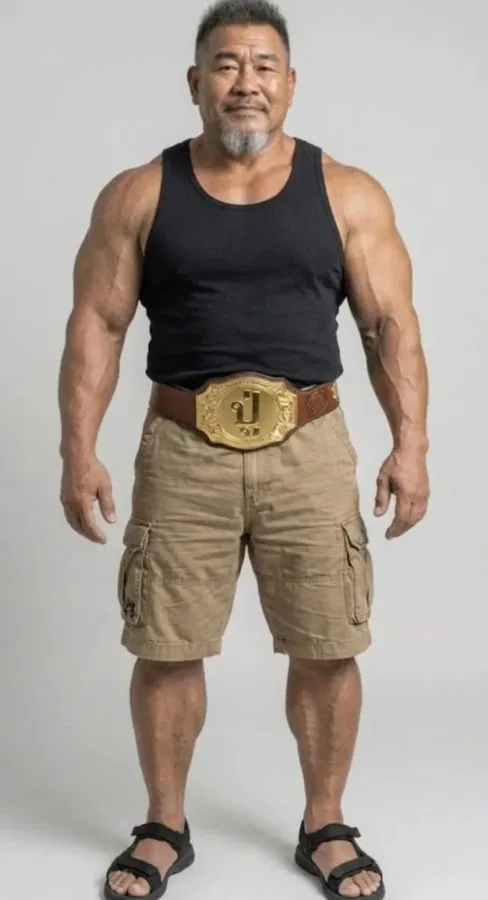
- A full-body photo of your character in the outfit.
- Seedance 2.5. I ran it on Enhancor.
Use a clip you own or have permission to use. My test clip came from a real competition and is not mine, so I do not show that video here.
The steps
6 steps- Pick the clipSpins hide the face. Choose a clip where the face shows at the start or the end.
- Get your two photos readyFace photo is Image 1. Full-body photo is Image 2. The video is Video 1.
- Mark the dancerA mask tool finds the dancer in every frame, so only the dancer gets replaced. I used SAM 3 on Replicate and told it: breakdancer in a white t-shirt and white pants.
- Run the swap as a cheap draftSeedance 2.5 in edit mode, 480p draft first. Paste the prompt below.
- Check the draftLook at hands, feet, shoes and the face. Fix the prompt before you pay for HD.
- FinishPut the original sound back. Add captions after the swap, never in the prompt.
The prompt to copy
Fill in the [brackets] with your own character and moves.
Replace the complete breakdancer with @Image1 (face) and @Image2 (body/outfit): [character name], [age + build, e.g. a muscular older man], [face + hair, e.g. wide face, short grey crew cut, grey goatee], wearing [outfit exactly as in @Image2]. Keep the face exactly as @Image1. [Expression, e.g. serious, focused face].
Keep every movement identical to @Video1: [list the moves in order, e.g. the run-in, the hand plants, the windmill, the freeze and the landing], with the same camera framing and timing. Natural hands with five fingers and two feet in every frame. Only replace the dancer; keep the stage, the lights, the crowd and the background exactly as they are. No text, no subtitles, no added logos.
My real prompt
Word for word, for Grandpa Boonmee. The line about colored depth is there because my setup feeds the AI a depth version of the clip as a motion guide.
Replace the complete breakdancer with @Image1 (face) and @Image2 (body/outfit): Grandpa Boonmee, a muscular older Thai strongman with a wide face, short spiky salt-and-pepper crew cut and a grey goatee, wearing the black tank top, khaki cargo shorts, black sandals and the brown leather championship belt with the big gold buckle from @Image2. Keep his face and goatee exactly as @Image1. Serious, focused face.
Keep every movement of the power move identical to @Video1: the run-in, the hand plants, the double airflare rotations, the legs flaring overhead and the landing, with the same camera framing and timing. Natural hands with five fingers and two feet in every frame. Only replace the dancer; keep the stage, the lights, the crowd and the background exactly as they are. The colored depth is motion guidance only and must disappear. No text, no subtitles, no added logos.
What went wrong and how I fixed it
4 problemsSolved
The mask tool could not find the dancer
It found nothing on the depth version of the clip. An upside-down spinning body confused it. I ran it on the normal color clip instead, and it found the dancer in every frame. Then I made the mask a little wider so no edge of the old dancer showed.
Solved
The caption broke
The apostrophe in the caption broke the video command and code showed on screen. Putting the caption in a text file and loading it from there fixed it.
Still open
Sandals turned into shoes
In some frames his black sandals became black shoes. Next time I name the footwear twice in the prompt.
Normal
The face is hidden in the spins
During power moves the face is mostly out of view. That is fine. It shows on the run-in.
What one swap cost me
12 Nov 2026Prices change. Check before you start. No promise of views or money.
Credit
My setup is built on the open-source Genjutsu workflow by Sirio Berati. The swap model is Seedance 2.5.
Next
I am building a one-click version of this swap for this site. Until then, these help: